Exercism - Keeping Fundamentals Sharp Alongside AI
Small Python, JavaScript, and TypeScript exercises alongside full-stack project work
- Python
- JavaScript
- TypeScript

Why I still solve little puzzles by hand
Alongside full-stack project work and AI-assisted development, I keep a small habit of solving language exercises myself. Exercism gives me focused problems in Python, JavaScript, and TypeScript, with tests and community solutions to learn from. It is a practical way to keep the fundamentals in use.
The overview
Exercism is a free, open-source, non-commercial coding practice platform. You pick a language track, solve small problems against a test suite, and - if you want - ask a volunteer mentor for a code review. It is run as a UK not-for-profit by Katrina Owen, Jeremy Walker and Erik Schierboom, and it is genuinely free forever - no paid tier, no upsell. The catalog is huge - 82 language tracks at the time of writing, thousands of exercises, and roughly two million users. What keeps me coming back though is not the scale. It is that solving a problem on Exercism feels like *thinking*, not like *prompting*.
Why I use it - the honest reason
Project work means balancing requirements, interface behavior, backend rules, and delivery. I also use coding assistants throughout that work. Exercism gives me a small space to focus on one language problem and write the solution myself. I choose the data structure, follow the test failures, and compare approaches once it works. That practice supports the judgment I need when reviewing a larger change.
- A quiet session with just the editor and the test suite
- Write the solution from scratch, see it pass, then read other people's solutions
- Short enough that it fits into a normal day without displacing real work

Python is the home track
Python is the language I reach for instinctively - scripts, automation, small data tasks, anything adjacent to ML. Because I know it well, it is the language where I most enjoy working through small problems by hand - the familiarity is the point, not the challenge. Practice-mode exercises - the ones that do not teach a specific concept but just pose a problem - are the sweet spot. Reverse a string without slicing tricks. Roman numerals. Leap year. Allergies as a bitmask. Run-length encoding. None of them are hard, and that is why they work - they fit in a coffee break and they give me a reason to pick the exact right standard-library tool, write it cleanly, and move on.
- Most work in Python - idioms, standard library, dunder methods, comprehensions, iterators
- Practice-mode exercises preferred over the learning track - I already know the language, I just need reps
- Read at least two community solutions after every problem - that is where the idiomatic improvements live
JavaScript and TypeScript alongside Python
JavaScript and TypeScript are part of my frontend work, where frameworks can hide some of the language mechanics. Short exercises let me focus on those directly: closures, iterators, asynchronous behavior, narrowing, and generics. Moving between these tracks and Python is useful practice for reading and reviewing code across a full-stack application.
- JavaScript - closures, iterators, functional patterns, array methods
- TypeScript - generics, utility types, narrowing - the parts a framework normally hides
- Small, specific, focused - none of the 'build a full app' pressure of real project work
How the platform actually works
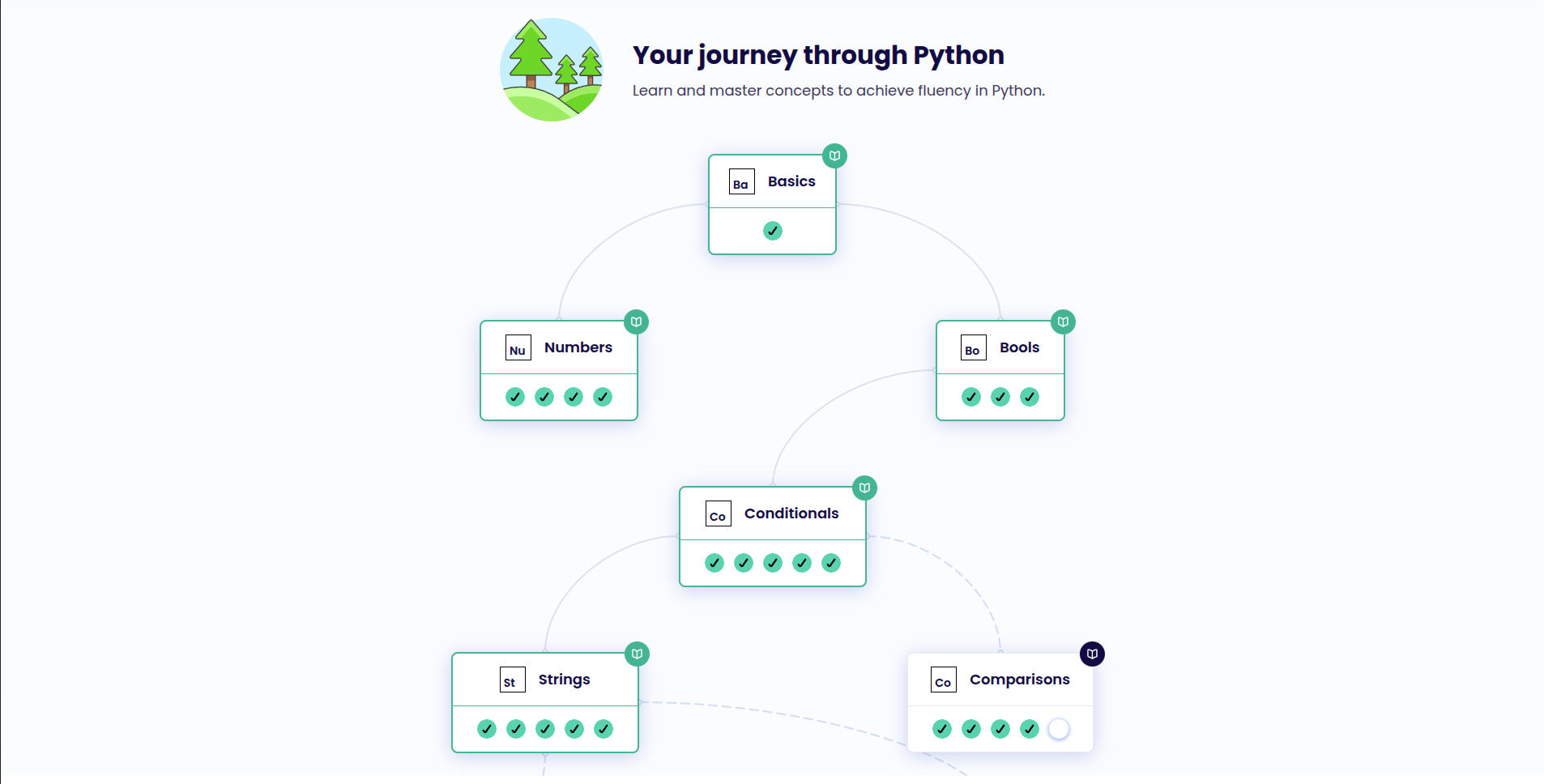
Every track has a Syllabus - a tree of Concepts, each unlocking the next. Inside a track there are two kinds of exercises: Learning Exercises (concept-first, introduced by a short write-up) and Practice Exercises (just a problem plus tests). New tracks default to Learning Mode so you progress through the syllabus in order; you can switch to Practice Mode to unlock everything at once, which is what I do for languages I already know. You can solve exercises in the web editor or download them and solve locally with their CLI - I use the web editor for quick sessions and the CLI when I want to run the tests in my own environment. Submissions get automatic feedback from the track's analyzer (style, common anti-patterns), and optionally a human mentor will review your solution and suggest idiomatic improvements.
- Syllabus - tree of Concepts, unlocked in order when you are learning a language
- Learning Mode vs Practice Mode - pick one based on whether you already know the language
- Web editor or CLI - both valid, both free
- Automated analyzer + optional human mentor - the mentor review is the hidden gem
The mentor review is the hidden gem
The automated analyzer catches style issues. The human mentor catches thinking issues. A solution passes its tests, looks fine to you, and then someone who has written idiomatic Python for a decade comments 'this is a dict.get default - you do not need the if/else.' You cannot really buy that feedback anywhere else. It is not code review for production - it is review for *how you think about the problem*, which is a different kind of feedback than what a test suite or a linter gives you. Volunteer mentors are reviewing asynchronously and for free, so the response time varies, but when a review lands it is usually the most useful five minutes of my week.
My workflow - small, regular, boring
I do not sit down for hour-long sessions. The whole point is that it is short enough to be frictionless. One or two problems before I start real work a few days a week, maybe a slightly harder one on a weekend. For these specific sessions I keep the AI closed - not as a rule about coding in general, just a small rule about *this* practice time. If I get stuck for more than ten minutes I close the tab and come back tomorrow; sitting with the problem a bit is part of the value. I read at least a couple of community solutions after each one, and if something is a genuine unknown I read the relevant Concept page - not the docs, not a blog, the track's own Concept write-up, which is usually tight and example-driven.
- Short sessions - 15 to 30 minutes, not marathons
- AI closed for *these* sessions specifically - not a rule about coding in general
- Stuck more than ten minutes - stop, come back later
- Always read community solutions after passing - that is where the lesson really lives
What I actually get out of it
The concrete gains are small individually and real in aggregate. I reach for the right standard-library function faster. I catch my own non-idiomatic patterns as I type them. I write tests with more specificity because Exercism trains you on what a good test shape looks like. And when I am back in my normal AI-assisted flow, I can read a suggestion and make a better call about whether to take it as-is or tweak it, because I recently wrote something similar with my own hands. It makes me a better partner to the assistant, not a replacement for one.
- Faster reach for the right standard-library tool
- Better instinct for idiomatic vs 'just works' code
- Clearer judgement on when to accept an AI suggestion as-is and when to tweak it
- A quiet confidence that my fundamentals are staying fresh
Who it is for
If you are brand new to programming, Exercism has a beginner course called Jiki, but honestly - a full course like Odin or CS50 is probably a better on-ramp. Exercism shines once you already know a language well enough to have opinions. It is for the mid-level-and-up developer who wants to stay sharp, the polyglot trying a new language in the '12 in 23'-style challenge, or - like me - the daily AI user who wants a regular deliberate-practice habit. It is not a replacement for building real things. It is the gym, not the job.
Summary
I use Exercism for short, focused practice in Python, JavaScript, and TypeScript. It complements building complete applications by letting me concentrate on the languages themselves. Solving a problem, reading the tests, and comparing community solutions keeps me actively involved in the details I need to understand when writing or reviewing production code.